
Access
To access the functionality to assign Contract to OCI Object Visibility, go to Master Data > Contract to OCI Object Visibility.
Overview
Contract to OCI Object Visibility functionality allows you to assign an OCI Object Visibility to a Contract.
The search for the Contract to OCI Object Visibility may be restricted by the following parameters:
OCI Object Visibility: to show only the assignments with the relevant OCI Object Visibility.
- Contract: to show only the assignments with the relevant Contract.
Click the Search button to initiate the search. The screen displays the search results, if found.
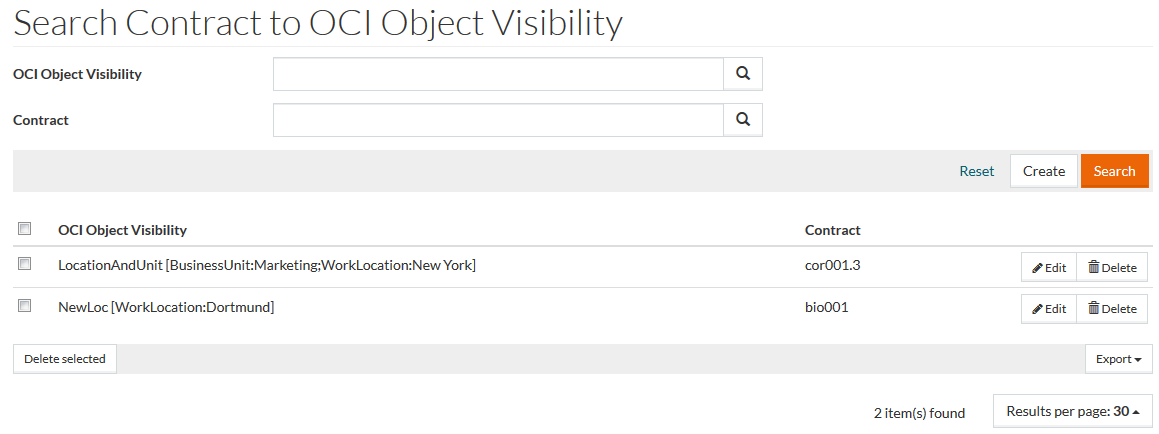
See the Basic Actions page for information on standard actions.
Create Contract to OCI Object Visibility
To create a new Contract to OC I Object Visibility click the Create button.
In the opened Contract to OC I Object Visibility editor you can assign the OC I Object Visibility to the Contract.
Enter details in the following required fields:
- OCI Object Visibility: select the OCI Object Visibility using the autocomplete function or reference search.
- Contract: define the Contract using the autocomplete function or reference search.
In editing mode, it is not possible to change the Contract for the saved Contract to OCI Object Visibility entry.
Click the Save button to assign the OC I Object Visibility to the Contract.