
Access
To open and access Management Hierarchy, click the User and Role Administration menu - > Management Hierarchy menu item of the User and Master Data application. This opens an editor to search, create, edit, and delete Management Hierarchies.
Contents
Functionality
In organizations, there are various levels of management that form a hierarchy. These levels of managers form a hierarchy, ranked in order of importance based on job titles, roles and primary responsibilities. These managers in turn are empowered to assign responsibilities and tasks to the employees reporting to them depending on the type of management task each does and the roles that they take in their jobs. See the Basic Actions page for more info on standard actions (search, sort, edit, delete etc.).
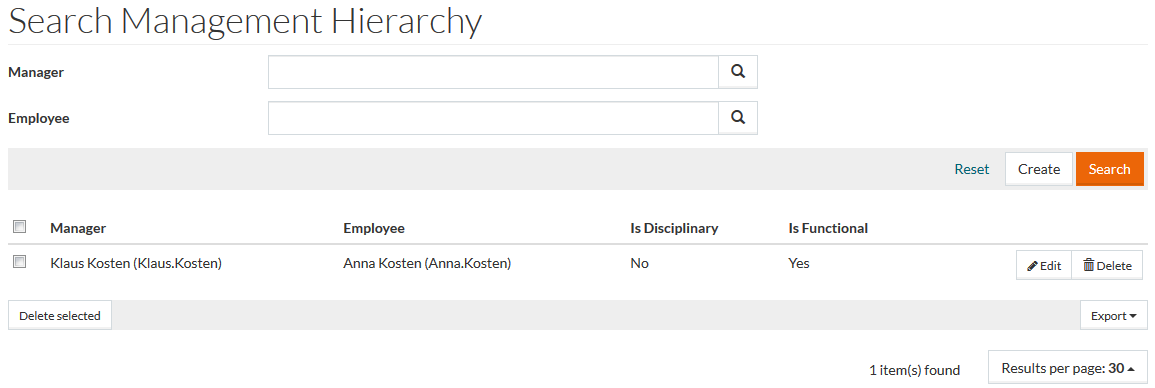
Create Management Hierarchy
Click the
Create button to open the
Editor to create/add a new management hierarchy. Enter details for
Manager and
Employee or use the respective
 to search and select. These are mandatory fields.
Click
 by
Is Disciplinary and
Is Functional fields to define the subordination type if required.
by
Is Disciplinary and
Is Functional fields to define the subordination type if required.
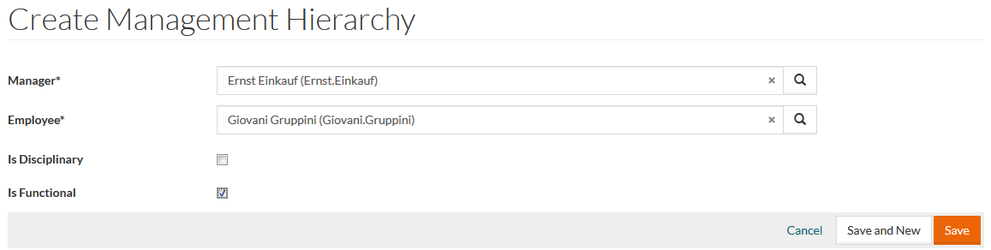
Click Save to save the new management hierarchy or click the Cancel link to cancel.