
Access
To open the Responsibilities Revisions Report page, in the User and Master Data application, click Authorization menu -> Responsibilities menu item.
You can also click the Revisions Report button in the Responsibilities search result table to open the Revisions Report for the selected responsibility directly.
Functionality
Responsibilities Revisions Report allows to see all changes in the responsibility record for a given period of time.
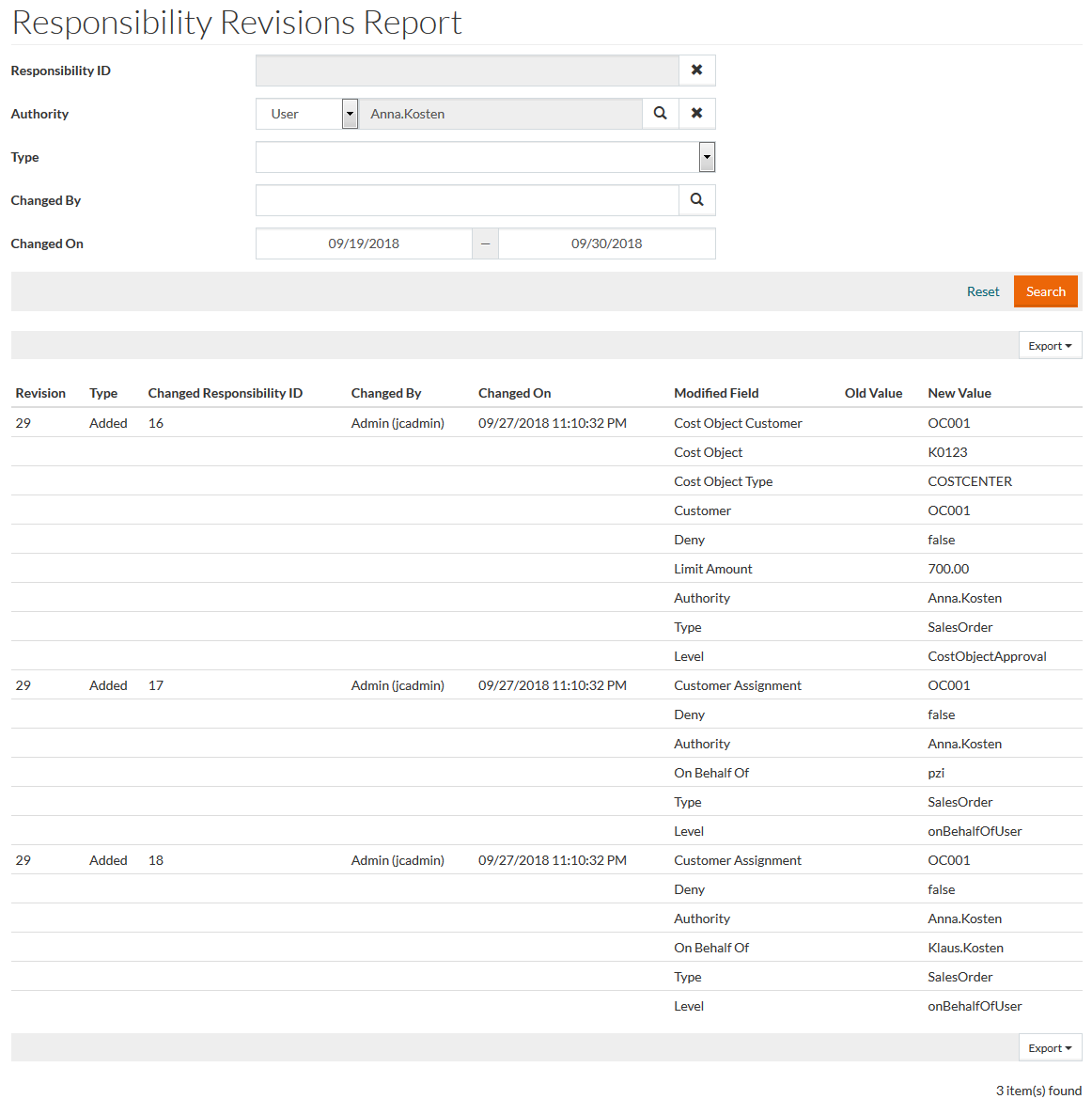
The Responsibility ID field is prefilled, when the revisions report is opened for a particular responsibility from the Responsibilities search page.
Other Responsiblities Revisions Report parameters include:
- Authority: select the Athority to open the report for a particular User, Role or Group.
- Type: select the Responsibility Type from the drop-down list to open the report for a particular responsibility type.
After selecting the type, the type-specific parameters become available for the selection.
- Changed By and Changed On: select a user and date range to open the report depending on the user who made the changes and the time period when the changes were made.
Click the Search button to see the search results.
You can click the Revision number for the ' Modified' type revision to open a page showing the differences in the responsibility information.
To expand the report and see more report items, when available, click Show next 20 items link.
You can export the search result table as a XLS or CSV file, for this click the appropriate option of the the Export drop-down.