
Access
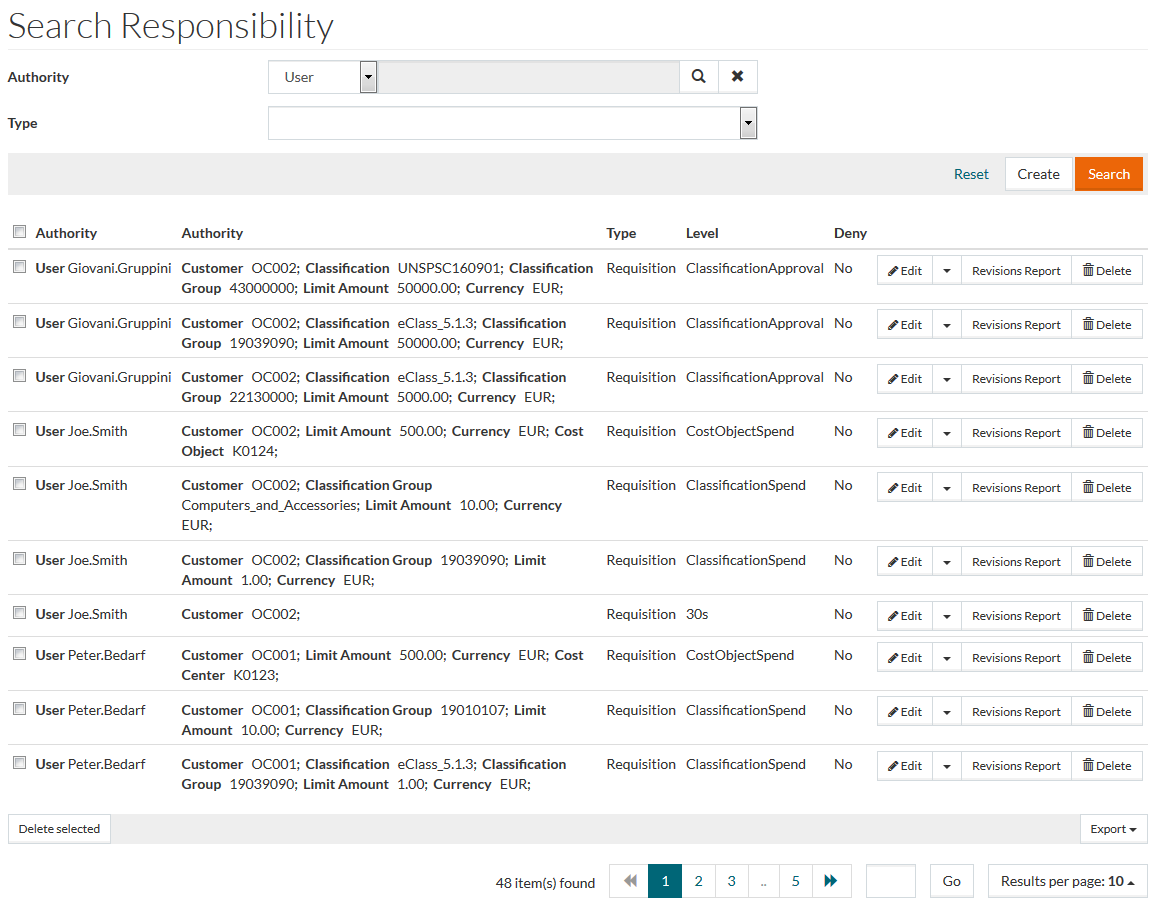
To open the Responsibility search page in the User and Master Data application, click Authorization menu -> Responsibilities menu item.
Contents
Functionality
Though users have permission to access menus of a module, they cannot perform any operations unless the user has been assigned the responsibility to do so. The Responsibility Editor makes it possible to permit users to perform some operations and assign the required Responsibilities to a user, role, or user group (in turn to user).
The responsibilities and permissions are dependent on each other. If a user has responsibilities and does not have permission to access menus, the user cannot perform any responsible action and vice versa. See the Basic Actions page for more info on standard actions (search, sort, edit, delete etc.).
Create Responsibility
To add/create a Responsibility, click the
Create button to open the Responsibility Editor. On this page, select
Authority,
Type and
Level from the drop down menu, click
 to search and select wherever applicable,
Type is a mandatory field and the parameters change depending on the Responsibility
Type that is selected.
to search and select wherever applicable,
Type is a mandatory field and the parameters change depending on the Responsibility
Type that is selected.
Additional field in regard to the posting model (Posting Dimension Value) for Requisition and Purchase Order type responsibility are available, when the configuration attribute is set to 'true'.
Click
 to delete the entries. Check
Deny
to delete the entries. Check
Deny
 to deny access granted for the selected level.

Click Edit to edit Responsibility Levels. Click Save to save the new Responsibility or Cancel to cancel and return to the search page.
Duplicate Responsibility
Select the Duplicate option from the Edit drop-down list on the search page or the Duplicate button in the Responsibility editor to create a copy of the selected Responsibility.

Click Save to save the duplicated Responsibility or Cancel to cancel and return to the search page.
Responsibility Revisions and Revisions Report
Select Revisions option from the Edit drop-down list on the search page to see the versions information and changes for the responsibility.
Click the Revisions Report to open the Responsibilities Revisions Report page for the selected responsibility.
Action IDs and Their Descriptions
The RESPONSIBILITYACTION table of the central DB currently contains the following hard-coded list of Responsibility Actions:
The responsibilities can be classified by the application they are exercised in:
OPC
Type | Action ID | Description |
|---|---|---|
Classifications | viewOnOpcSearchResult | Show classification in search result facet |
Classifications | viewOnOpcDetails | Show in OPC Details page |
Classifications | viewInOpcClassificationInformation | Show in OPC Classification Information |
| ProductCatalog | Replenishment | Determines responsible person for order of the Real Products of Material |
Requisition | viewSalesOrder | This action is required to view sales oders |
Requisition | orderSalesOrder | This action is required to place sales orders |
Requisition | viewShoppingList | Read Access to shopping lists requires this action |
Requisition | editOwnShoppingList | Creation and modification of own shopping lists requires this action |
Requisition | editOthersShoppingList | Modification of shopping lists created by other users which are shared by role or customer requires this action |
Requisition | createRoleShoppingList | This action is required to be able to create shopping lists shared with other users by role |
Requisition | createCustomerShoppingList | This action is required to be able to create shopping lists shared with other users by customer |
Requisition | onBehalfOfUser | Access to shopping cart on behalf of user |
| Requisition | createCountryShoppingList | This action is required to be able to create shopping lists shared with other users by country id (only for OCI users) |
| Requisition | createCompanyShoppingList | This action is required to be able to create shopping lists shared with other users by company (only for OCI users) |
| Requisition | createWorkLocationShoppingList | This action is required to be able to create shopping lists shared with other users by work location (only for OCI users) |
| Requisition | createBusinessUnitShoppingList | This action is required to be able to create shopping lists shared with other users by business unit (only for OCI users) |
| Requisition | GLAccountBudget | Determines responsible person for GLAccount related Budgets. |
| Requisition | createCustomerDraftRequisition | This action is required to be able to create an Draft Requisition shared with other users by the customer. |
| Requisition | AdminDraftRequisition | This action is required to be able to see all draft requisitions in scope of current customer. |
PIM
| Type | Action ID | Description |
|---|---|---|
| Attribute | Edit | Edit Attribute Link in Product Editor Details depends on this action |
| Attribute | EditValue | Attribute value editing in Product Editor requires this action (together with Attribute Value Edit in Type Product, View Assignment in Type Classification (for the Classification Group to show up in PE Details) and Edit in Type Language) |
| Attribute | ViewValue | Attribute value display in Product Editor Details requires this action (together with View in Type Language) |
| Classification | AssignProduct | Drag and Drop Product to Classification Group in Product Editor Tree requires this action for the Classification Group |
| Classification | CreateGroup | Drag and Drop Classification Group to another Classification or one of its groups in Product Editor Tree requires this action for the target Classification Group |
| Classification | DeleteGroup | Drag and Drop (move only) Classification Group to another Classification or one of its groups in Product Editor Tree requires this action for the source Classification Group |
| Classification | EditGroup | Edit Classification Group link in Product Editor Details depends on this action |
| Classification | UnassignProduct | Delete Classification Group Association in Product Editor Details or via Drag and Drop in Product Editor Tree |
| Classification | ViewAssignment | See this Classification Group Association and possibly the attributes in Product Editor Details, it is required for editing attribute values for this Classification Group |
| Language | Edit | Editing ProductAttributeValues in Product Editor Details and Product Editor Translation requires this action (together with AttributeValueEdit in Type Product and EditValue in Type Attribute) |
| Language | View | Viewing ProductAttributeValues in Product Editor Details and Product Editor Translation requires this action (together with ViewValue in Type Attribute) |
| Price | PricesEdit | Required to edit Prices in Product Editor Details and Contract Comparison (together with PricesEdit in Type Product) |
| Price | PricesView | Required to view Prices in Product Editor Details and Contract Comparison (together with PricesView in Type Product) |
| Product | AssignProduct | Drag and Drop Product to Product in Product Editor Tree requires this action for target product |
| Product | AssignGroup | Drag and Drop Product to Classification Group in Product Editor Tree requires this action for the product |
| Product | AttributeValueEdit | Editing Product Attribute Values in Product Editor Details/Grid requires this action (together with EditValue in Type Attribute and Edit in Type Language) |
| Product | PricesEdit | Editing Prices in Product Editor Details and Contract Comparison requires this action (together with PricesEdit in Type Price) |
| Product | PricesView | Viewing Prices in Product Editor Details and Contract Comparison requires this action (together with PricesView in Type Price) |
| Product | PropertyEdit | Editing product master data in Product Editor requires this action |
| Product | RelationEdit | Edit relation in Product Relation Grid on Product Editor Details requires this action for the product |
| Product | RelationView | View relation in Product Relation Grid on Product Editor Details requires this action for the product |
| Product | UnassignGroup | Moving product from one Classification Group to another in Product Editor Tree and deleting ClassificationGroupAssociation in ProductEditor Details requires this action |
| Product | UnassignProduct | Deleting Product Relation by Drag and Drop in Product Editor Tree or by ProductRelation Grid in Product Editor Details requires this action |
| Product | Delete | Delete product in Product Editor Grid, Product Editor Details and Product Editor Tree requires this action |
| Product | DocumentEdit | Edit Product Doc Association in Product Editor on Document Grid requires this action |
| Product | ContractInfoEdit | Edit Contracted Products in Product Editor on ContractInfo Grid requires this action |
PROC
| Type | Action ID | Description |
|---|---|---|
| Requisition | approveSalesOrder | Used in Approver Easy Search to determinate the approvers for a certain approval step in PROC |
| Requisition | FreetextApproval | Determines approvers for Free Text Approval in standard PROC Workflow |
| Requisition | CostObjectApproval | Determines approvers for Cost Object Approval in standard PROC Workflow |
| Requisition | EditApprovalSalesOrder | Edit Sales Order during the approval process |
| Requisition | ForwardApprovalSalesOrder | Forward Sales Order to another user during approval process |
| Requisition | RejectApprovalSalesOrder | Reject Sales Order during the approval process |
| Requisition | RejectApprovalSalesOrderItem | Reject Sales Order item during the approval process |
| Requisition | ClassificationApproval | Determines approvers for CostObject Approval in standard PROC Workflow |
| Requisition | ClassificationGroupBudget | Determines a responsible person for ClassificationGroupBudget related Budgets. |
| Requisition | ClassificationSpend | Determines spend limits on classification |
| Requisition | CostObjectSpend | Determines spend limits on cost object |
| Requisition | CustomerVisibility | Indicates for the user that they can see all objects in their OrderGroup (customer assignment) |
| Requisition | CustomerWorklistVisibility | Indicates for the user that they can see approvals of other users of their current customer assignment |
| Requisition | InspectApprovalSalesOrder | Indicates that user can send SalesOrder for additional inspection |
| Requisition | ProfessionalBuyerInteraction | Allows possibility to add requisition to another purchase order |
| Purchase Order | POCostObjectApproval | Determines Purchase Order Cost Object approvers for PO-Change approval workflow |
| Purchase Order | POCostObjectReject | Determines who can reject PO changes during the PO-Change approval workflow |
| Purchase Order | POCostObjectSpend | Determines the Purchase Order Cost Object spend limit for PO-Change approval workflow |
| Purchase Order | ForwardApprovalPurchaseOrder | Forward PurchaseOrder to another user during the approval process |
| Purchase Order | CustomerWorklistVisibility | Indicates for the user that they can see approvals of other users of their current customer assignment |
| Contract | ConfirmPO | Defines assignees for confirmation of Purchase Order |
SSM
| Type | Action ID | Description |
|---|---|---|
| ProductCatalog | ContentManagement | Defines the assignees for node 'Approval Level 1' (Content Management) of the Customer workflow |
| ProductCatalog | ApprovalLevel2 | Defines the assignees for node 'Approval Level 2' (Technical Approval) of the Customer workflow |
| ProductCatalog | ApprovalLevel3 | Defines the assignees for node 'Approval Level 3' (Commercial Approval) of the Customer workflow |
| ProductCatalog | ApproveFrameAgreement | Defines the assignees for the node 'Approval' |
| Contract | ContentManagement | Defines the assignees for node 'Approval Level 1' (Content Management) of the Customer workflow |
| Contract | ApprovalLevel2 | Defines the assignees for node 'Approval Level 2' (Technical Approval) of the Customer workflow |
| Contract | ApprovalLevel3 | Defines the assignees for node 'Approval Level 3' (Commercial Approval) of the Customer workflow |
| Contract | NotifyExpiredContract | Viewing ProductAttributeValues in Product Editor Details and Product Editor Translation requires this action (together with ViewValue in Type Attribute) |
| Requisition | FrameAgreementContract | Determines responsible person for FrameAgreement related Contracts |
RFQ
| Type | Action ID | Description |
|---|---|---|
| Requisition | AwardRequestForQuote | Defines RFQ approver rights - possibility to approve RFQs created by other users |